
Back to Help
Feature Guide

Wallet Hunt

Capture multiple token holder snapshots and surface wallets that keep recurring across them.

Why this exists

This is built for finding repeated actors across launches, metas, or related token sets.

Best for

  • Tracking recurring wallets across launches.
  • Checking whether the same top holders keep reappearing.
  • Saving overlap candidates directly into Tracked Wallets.

Open the feature

Use the guide for framing. Use the live page for actual analysis.

Open Wallet Hunt

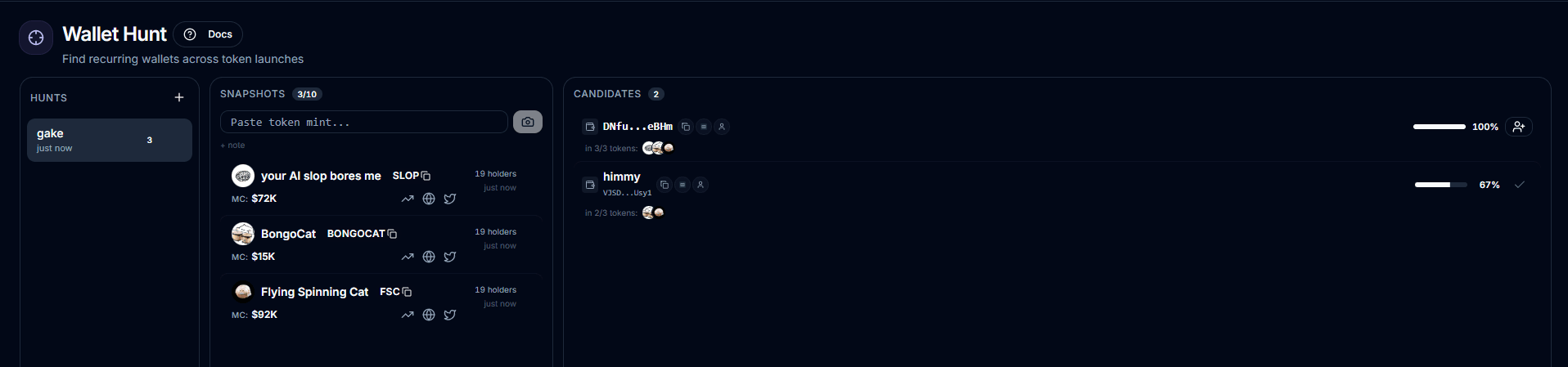
Screenshot

Main product view for Wallet Hunt.

Wallet Hunt dashboard screenshot

Quick read

Read workflow first to understand how the page is supposed to be used.

Read what to expect and limits before you trust the output literally.

Use the FAQ for edge cases.

Typical workflow

1

Create a hunt.

2

Add token snapshots for the launches or tokens you want to compare.

3

Review overlap candidates and track the ones worth following.

What data is inside

Saved hunts, token snapshots, and overlap candidates.

Candidate confidence based on how many unique token snapshots a wallet appears in.

Token-level appearance context so you can see where the overlap came from.

What to expect

With only one snapshot, candidates are just that token's holder list.

Real overlap only appears after multiple snapshots.

Inactive hunts warn first, then auto-delete later.

Limits

Maximum 5 hunts per user.

Maximum 10 snapshots per hunt.

The same token and source pair cannot be added twice to one hunt.

Inactive hunts warn after 14 days and auto-delete after 21 days.